 Mr Viral
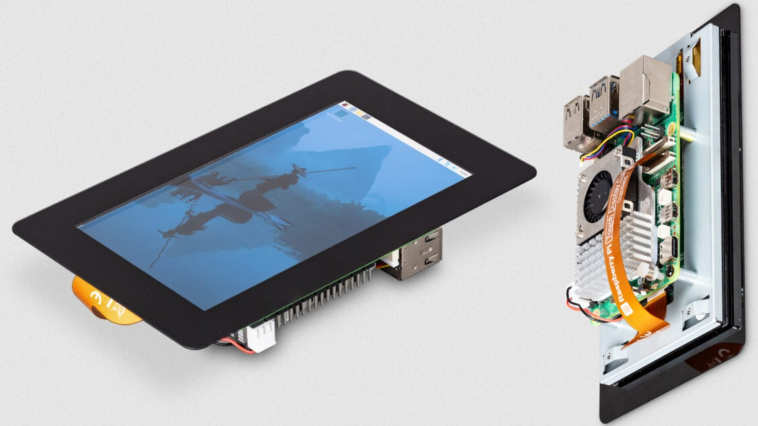
Image: Raspberry Pi
This weekend, a friend of mine showed off their RetroPi setup along with their mad skills in Super Ghouls ‘n Ghosts and Yoshi’s Cookie. I wonder how well they’d do if they had to switch from a full TV to a tiny screen that would make a modern smartphone blush? I mean, $40 is all it would take for me to disguise a cruel joke as a gift, and I’m tempted.
If you’re actually looking to use this thing for a project instead of a mean-spirited gaming handicap, then you’ll probably be doing so for some kind of small gadget or monitor. The Raspberry Pi’s 5-inch 1280×720 touchscreen (spotted by Tom’s Hardware) is perfect for that, mounting directly on the bottom of a Pi and featuring a 5-point multitouch panel. It’s powered directly from the Pi’s GPIO with just 5 volts, so it won’t take up one of your precious USB ports. A few simple settings in rasp-config is all it takes to get it all working.
The new version of the screen shares almost all the same specifications as the 7-inch model (which has now been around for 10 years, wow) with the obvious exception of its size, and it’s compatible with all full-sized Pi models going back to the B+. It’s not especially impressive in terms of its panel, with a viewing angle of just 80 degrees and a rather chunky bezel. But for a standalone controller or some neat little project gadget that sits on your desk, it’s pretty darn cool.
Author: Michael Crider, Staff Writer, PCWorld
Michael is a 10-year veteran of technology journalism, covering everything from Apple to ZTE. On PCWorld he’s the resident keyboard nut, always using a new one for a review and building a new mechanical board or expanding his desktop “battlestation” in his off hours. Michael’s previous bylines include Android Police, Digital Trends, Wired, Lifehacker, and How-To Geek, and he’s covered events like CES and Mobile World Congress live. Michael lives in Pennsylvania where he’s always looking forward to his next kayaking trip.






GIPHY App Key not set. Please check settings