 Mr Viral
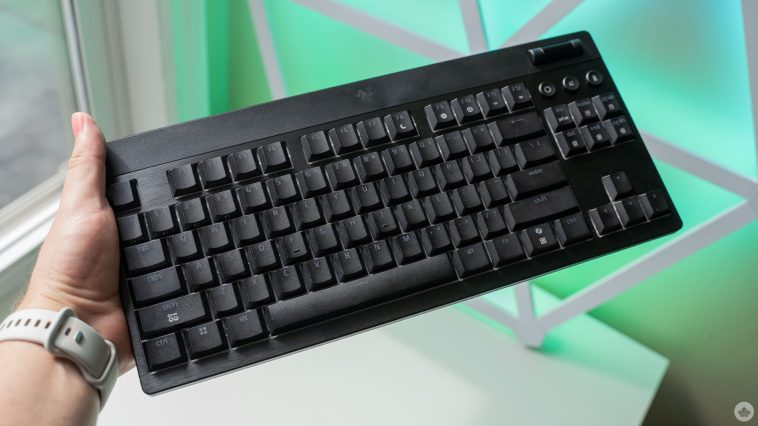
Last year, Razer’s Blackwidow V4 Pro 75% keyboard earned its place as my primary input option, but now Razer has a new contender for my desk: the Blackwidow V4 Low-Profile Hyperspeed.
I was a big fan of the V4 Pro’s size and feel, and I’ve been typing and gaming on it since November 2024. However, the new low-profile board from Razer offers a similar experience in a sleeker package, and there’s a lot to love.
First, the Blackwidow Low-Profile comes in two flavours, a full-size board and a tenkeyless (TKL) variant, which is what I opted to try out, as it was the closest option to my beloved V4 Pro 75% board.
Despite being low-profile — and thus being considerably shorter than the V4 Pro — the new keyboard still boasts mechanical switches. Specifically, Razer’s unique low-profile switches, which come in the same three variants as Razer’s regular switches: clicky Green, tactile Orange, or smooth and quiet Yellow.
Razer’s Blackwidow V4 Pro (left) compared to the V4 Low-Profile (right).
Razer also touts its efforts to improve the typing experience by lubing the stabilizers and adding sound-dampening foam. I think these efforts help elevate the typing experience, though for some, building a custom keyboard and tweaking these things themselves will yield better results. For people like myself who might not have the time to dedicate to custom keyboard builds, Razer’s out-of-the-box experience is pretty solid.
I used to be a Green switch user, but I’ve since come to love the Orange switches, which offer similar tactility without the loud clicking of the Green switches. However, the Blackwidow Low-Profile’s Orange switches don’t quite feel the same as the full-sized ones on my V4 Pro. The most noticeable difference is in sound — the low-profile board is noticeably louder. And it’s not the switches, it’s the resonance in the keyboard itself. I suspect this is just a matter of the low-profile board having less sound-dampening foam compared to the V4 Pro, but it is worth noting. Beyond that, the switches are similar enough that both feel good to type on, but I slightly prefer the feel of the V4 Pro.
Razer advertises that its Orange and Yellow switches can last for up to 80 million keystrokes, while its Green switches are rated for 60 million. That means these switches should last a while, which is good since they’re not swappable like the V4 Pro. The downside, however, is that I’m not sure these switches have great longevity.
For example, I used a full-size Razer Blackwidow with Green switches for about four years before retiring it because multiple keys started registering double- and triple-input from a single click. I used a Durgod keyboard with Cherry MX Blue switches for roughly four years as well, but never had any issues with double-inputs. However, I’ve already had to replace one switch on the Blackwidow V4 Pro with Orange switches, which I’ve used since November 2024, because it started registering multiple inputs. It could be a fluke, but given my prior experience with Razer keyboard switches failing, I have some concerns.
Wireless connectivity, RGB, and a roller bar
Aside from the switches, the Blackwidow Low-Profile offers similar features to what you’d find on other Blackwidow boards. That includes wireless connectivity through Bluetooth or Razer’s HyperSpeed Wireless 2.4GHz tech, which relies on a USB dongle. (You can do wired connectivity, too, if you like.) There’s also a ton of RGB features, naturally.
The low-profile board doesn’t sport an OLED display like Blackwidow V4 Pro, but in my eyes, it’s not a huge loss. As a long-time V4 Pro user, I hardly ever use the OLED screen for anything other than playing a cool animation. In place of the screen is a roller wheel that, by default, controls the volume but can be remapped with Razer’s Synapse software.
Along with the roller bar, the Blackwidow Low-Profile sports several buttons. Both the TKL and full-size boards include a battery and AI buttons. When you press the battery button, the keyboard lights up the number row to show the battery percentage, e.g. at 50 per cent power, it lights up numbers one through five on the keyboard. This is an incredibly smart add and I wish more keyboards had a system like this because it makes it super easy to see how much battery is left. The AI button launches Razer’s AI Prompt Master, and given my feelings on AI, I never bothered to press it.
Beyond that, the two Low-Profile board sizes differ in buttons. The TKL has one more, a multi-function media button for controlling playback with play/pause and next/previous track functions. The full-size board, however, has a dedicated set of media control buttons along with buttons to switch between Bluetooth and HyperSpeed wireless, and four programmable macro buttons. So, if you like buttons, grab the full-size Blackwidow Low-Profile.
One of the smartest battery indicators I’ve seen on a keyboard
Pressing the battery button lights up number keys to let you know how much battery remains.
Finally, there’s the matter of battery life. Razer advertises a whopping 980 hours of battery life, but that’s while using the keyboard’s Power Saving Mode, which limits and restricts some features and functionality. The mode locks the keyboard’s polling rate to 250Hz, turns off the RGB lighting, and pauses communication with Razer Synapse in order to extend the battery life. Unfortunately, I haven’t had the keyboard long enough to fully test the battery life, and Razer hasn’t shared how long it will last while not using Power Saving Mode.
However, with the V4 Pro, Razer claimed up to 2,100 hours while using Power Saving Mode, but without using it, I clocked closer to five hours of use before needing to recharge. It was one of my chief complaints about the V4 Pro, and because of it, I primarily use the keyboard plugged in.
Overall, the Blackwidow Low-Profile is a pretty solid keyboard, especially for those who want a more sleek typing experience. I’m impressed by Razer’s ability to shrink the mechanical keyboard experience while maintaining the things people love about it, like the tactility of the keyboard switches. Plus, the Low-Profile is a bit more affordable than some other Razer keyboards at $249 for the TKL version and $289 for the full-size version. While I still prefer the V4 Pro for my usage, I think the Low-Profile board could make an excellent option for anyone who wants a more portable keyboard or just wants something that takes up less space on their desk.
MobileSyrup may earn a commission from purchases made via our links, which helps fund the journalism we provide free on our website. These links do not influence our editorial content. Support us here.






GIPHY App Key not set. Please check settings